


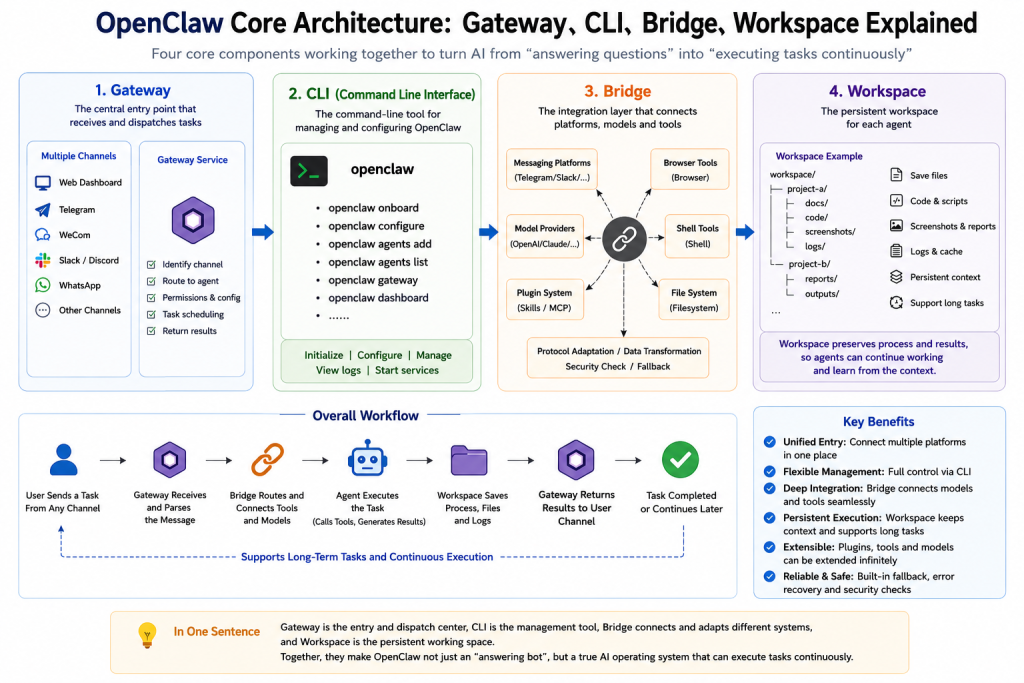
In the previous article, we explained why OpenClaw is not just another ordinary AI agent.
Most AI agents are designed to answer questions. A user sends a message, the model generates a response, and the task ends.
OpenClaw is different.
It is built around continuous execution. To understand how it works, you need to understand four core concepts:
Gateway, CLI, Bridge and Workspace.
These terms may sound technical, but the idea is simple:
Gateway connects, CLI controls, Bridge integrates, and Workspace preserves context.
If OpenClaw were an AI company, the Gateway would be the front desk and dispatch center, the CLI would be the admin console, the Bridge would connect different systems, and the Workspace would be the desk where each AI worker stores its work.
Gateway: The Central Entry Point
Gateway is one of the most important components in OpenClaw.
According to the official documentation, OpenClaw is a self-hosted gateway that connects messaging platforms such as Telegram, Slack, Discord and WhatsApp to AI coding agents. You run a single Gateway process on your own machine or server, and it becomes the bridge between messaging apps and an always-available AI assistant. (OpenClaw)
In plain English, Gateway is the main entry point.
A user may send a message from the browser dashboard, Telegram, Slack, Discord, WeCom or another channel. No matter where the message comes from, it eventually needs to reach the Gateway.
After receiving the message, the Gateway usually needs to:
Identify the source channel.
Decide which agent should handle the request.
Load configuration and permissions.
Pass the task to the runtime.
Return the result back to the user.
So Gateway is not just a simple web server. It is closer to a dispatch center.
In many deployments, you will see port 18789. This is commonly used as the Gateway entry point. The dashboard, plugins, remote connections and channel integrations may all depend on the Gateway.
A simplified flow looks like this:
User Message
  ↓
Telegram / Slack / Dashboard / WeCom
  ↓
Gateway
  ↓
Agent Runtime
  ↓
Tools and Models
  ↓
Result
If Gateway is not running correctly, most of the system will not work.
That is why debugging OpenClaw often starts with the Gateway, not the model.
CLI: The Admin Console
CLI means Command Line Interface.
The main OpenClaw command is usually:
openclaw
The official CLI documentation describes openclaw as the main CLI entry point for core commands, agents, configuration and related operations. (OpenClaw)
If Gateway is the runtime center, CLI is the admin tool.
You can use CLI commands such as:
openclaw onboard
openclaw dashboard
openclaw configure
openclaw agents add
openclaw agents list
openclaw gateway
One important command is:
openclaw onboard
The official documentation says CLI onboarding is the recommended setup flow for macOS, Linux and Windows via WSL2. It configures a local Gateway or remote Gateway connection, channels, skills and workspace defaults in a guided flow. (OpenClaw)
In other words, the CLI is not where end users chat with the agent.
It is where developers and operators manage OpenClaw.
You use CLI to initialize the system.
You use CLI to open the dashboard.
You use CLI to configure models.
You use CLI to add or manage agents.
A common beginner mistake is focusing only on the dashboard and ignoring the CLI. Once there is a port conflict, configuration error or failed channel binding, they do not know where to start.
To use OpenClaw seriously, you need to understand the CLI.
Bridge: The Connector Between Different Worlds
Bridge is a very important idea in OpenClaw.
OpenClaw does not run in isolation. It needs to connect many external systems:
Messaging platforms, model providers, browsers, shell commands, local files, plugins, MCP tools and even enterprise systems.
The Bridge makes these systems work together.
For example, when a user sends a message from Telegram:
Check this website and tell me if there are SEO problems.
Telegram cannot directly operate a browser.
The model cannot directly access the messaging platform.
The browser tool cannot directly reply to the user.
A Bridge is needed in the middle.
The flow may look like this:
Telegram Message
  ↓
Channel Bridge
  ↓
Gateway
  ↓
Agent Runtime
  ↓
Browser / Shell / Filesystem
  ↓
Model
  ↓
Result back to Telegram
The value of Bridge is that it turns incompatible systems into a unified workflow.
Messaging platforms understand messages.
Models understand prompts and context.
Browser tools operate web pages.
Shell executes commands.
Filesystem saves results.
These are naturally different systems. Bridge makes them cooperate inside OpenClaw.
The official documentation also mentions CLI backends as a fallback runtime when API providers are down, rate-limited or unstable. Some backends can receive gateway tools through a loopback MCP bridge. (OpenClaw)
This shows that Bridge is not only about messaging channels. It can also connect models, tools and runtime layers.
Workspace: The Agent’s Working Desk
Workspace is one of the most important concepts in OpenClaw.
Most ordinary AI agents do not have a real workspace.
You ask them to write an article, and they return text.
You ask them to write code, and they return code snippets.
You ask them to analyze a website, and they return suggestions.
After the task ends, the state is gone.
OpenClaw’s Workspace changes this.
A Workspace is like the agent’s working desk. During task execution, the agent can save files, logs, code, screenshots, reports and cached outputs.
For example:
workspace/
├── project-a/
│   ├── docs/
│   ├── code/
│   ├── screenshots/
│   └── logs/
│
├── project-b/
│   ├── reports/
│   └── outputs/
This means OpenClaw does not simply answer you. It can keep working around a project.
For example, if you ask it to perform an SEO audit for a website, a normal agent may return:
The title is too short.
The page is missing meta description.
Images do not have alt text.
You should add internal links.
OpenClaw’s ideal workflow is different:
Open the website
Crawl the pages
Capture screenshots
Analyze titles and descriptions
Generate a report
Save it to the workspace
Continue optimization later
That is the value of Workspace.
It turns the agent from a one-time chat tool into a continuous working system.
How These Four Parts Work Together
Now let’s connect the four concepts.
When you start using OpenClaw, you usually initialize and configure it through the CLI.
The CLI sets up the Gateway, model providers, channels, skills and workspace defaults.
Once Gateway is running, it receives user messages.
Bridge connects external platforms, tools, plugins and models.
Workspace stores files, logs and execution results.
The full flow looks like this:
CLI initializes the system
  ↓
Gateway starts the service
  ↓
Bridge connects channels and tools
  ↓
User sends a task
  ↓
Agent executes the task
  ↓
Workspace saves process and result
  ↓
Gateway returns the result
This is the real difference between OpenClaw and a normal chatbot.
A chatbot mainly asks:
How should I answer?
OpenClaw asks:
How do I receive the task?
How do I route it?
How do I call tools?
How do I save the process?
How do I continue execution?
How do I return the final result?
Common Beginner Misunderstandings
Many beginners confuse Gateway, CLI, Bridge and Workspace.
They think CLI is the whole OpenClaw system.
Actually, CLI is only the management tool.
They think Gateway is just a port.
Actually, Gateway is the runtime entry point and dispatch center.
They think Bridge is just a network connection.
Actually, Bridge is an integration layer across platforms, tools, models and runtimes.
They think Workspace is just a folder.
Actually, Workspace is the foundation for persistent task execution.
Once you understand these four concepts, OpenClaw deployment and debugging become much easier.
When the dashboard cannot open, check Gateway first.
When commands do not work, check CLI parameters and configuration.
When Telegram or WeCom messages do not arrive, check Bridge and channel configuration.
When the agent cannot save results, check Workspace path and permissions.
When model calls fail, then check provider, API key and model configuration.
Final Thoughts
The core of OpenClaw is not a single model.
It is not a single dashboard.
Its real value is the execution architecture:
Gateway: receives and dispatches tasks
CLI: configures and manages the system
Bridge: connects platforms, models and tools
Workspace: preserves context and results
If the previous article explained why OpenClaw is not an ordinary AI agent, this article explains how OpenClaw actually runs.
The next article can be:
OpenClaw Deployment Guide: Docker, Ports, Config Files and Dashboard Setup.
Be First to Comment