



Many people deploy OpenClaw for the first time, open the dashboard, type:
Write an article about AI startups
The model generates some text.
Then they immediately conclude:
“So OpenClaw is just Claude with another UI.”
This is one of the biggest misunderstandings.
Because what you see is only the final output.
The real work happens before that.
OpenClaw is not designed as:
User
   ↓
Model
   ↓
Result
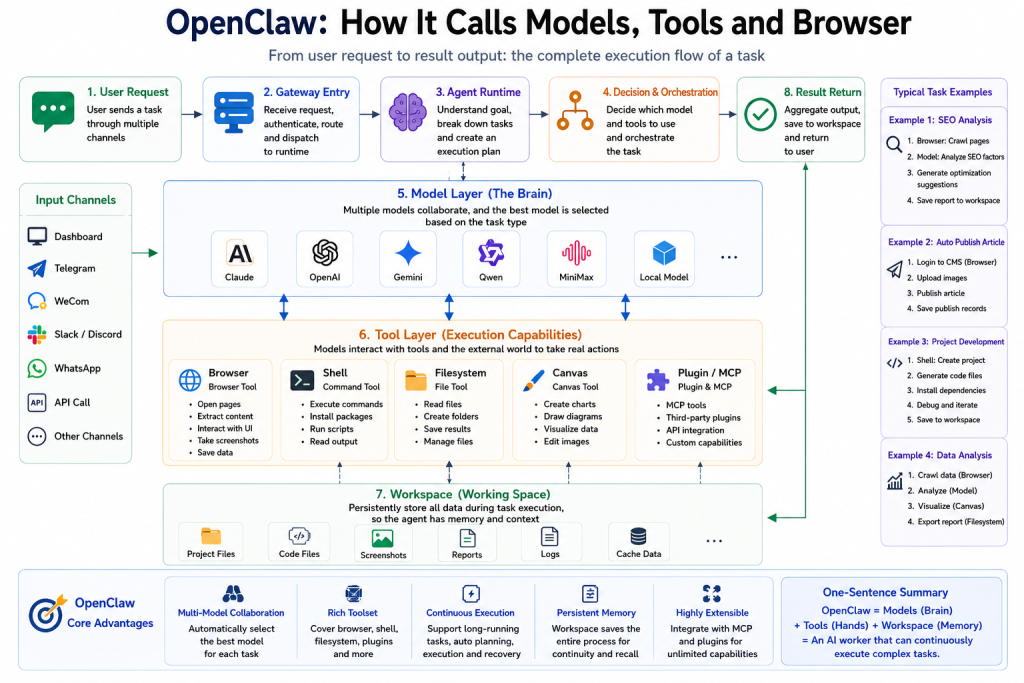
Its actual workflow looks much closer to:
User
   ↓
Gateway
   ↓
Agent Runtime
   ↓
Task Planning
   ↓
Tool Selection
   ↓
Browser / Shell / Filesystem
   ↓
Model Reasoning
   ↓
Workspace Storage
   ↓
Result
The model is only one component.
The real value comes from how OpenClaw decides:
- What should be done
- Which model should be used
- Which tools should execute the task
- How results should be stored and continued
This is why OpenClaw behaves more like an AI execution system than a chatbot.
Traditional AI Only Calls Models
Let’s first look at how most AI systems work.
Example request:
Write an article about AI entrepreneurship
Internal flow:
Prompt
   ↓
LLM
   ↓
Article Output
Task finished.
Nothing else happens.
No browser.
No file storage.
No command execution.
No retries.
No state.
Traditional AI focuses on:
How to answer
OpenClaw focuses on:
How to complete
That difference changes everything.
OpenClaw Does Not Call the Model First
Many people assume that once the user sends a request, OpenClaw immediately calls Claude or GPT.
Not necessarily.
Imagine this request:
Analyze the SEO of skills.lc and generate an optimization report
The system usually does not start with:
Claude:
Please analyze SEO
Instead, it begins with task understanding.
The internal logic may look like:
Receive Request
      ↓
Identify Goal
      ↓
Split Tasks
      ↓
Select Tools
      ↓
Choose Models
      ↓
Execute
The agent may divide the task into:
- Open website
- Read page content
- Extract title
- Analyze metadata
- Check images
- Inspect links
- Generate report
- Save output
At this point, the model might not even be running yet.
Because the runtime is still planning.
This planning layer determines everything that follows.
The Model Layer: OpenClaw Can Use Multiple Models
Traditional AI:
User
   ↓
GPT
   ↓
Result
OpenClaw:
User
   ↓
Runtime
   ↓
Model Router
   ├── Claude
   ├── OpenAI
   ├── Gemini
   ├── Qwen
   ├── MiniMax
   └── Local Models
It behaves more like a model orchestration system.
Example:
Planning:
Claude
Coding:
Qwen
Image understanding:
Gemini
Long document analysis:
OpenAI
Fallback:
MiniMax
A single task might become:
Task Starts
      ↓
Claude plans workflow
      ↓
Browser collects data
      ↓
Gemini analyzes images
      ↓
Qwen generates code
      ↓
OpenAI summarizes output
The user sees one response.
Internally, multiple models may have collaborated.
That is why OpenClaw feels closer to:
AI Runtime
Instead of:
AI Chat Interface
The Tool Layer: Models Think, Tools Act
Even the smartest model cannot:
- Open websites
- Click buttons
- Execute commands
- Save files
- Create reports
That work belongs to tools.
OpenClaw commonly uses:
Browser
Shell
Filesystem
Canvas
Plugins
MCP
Each tool has its own responsibility.
Browser:
Handles websites and automation.
Shell:
Executes commands.
Filesystem:
Stores outputs and project files.
Canvas:
Handles visual generation.
Plugins:
Extend functionality.
MCP:
Connects external systems.
Execution flow becomes:
Model
   ↓
Decide Action
   ↓
Call Tool
   ↓
Tool Executes
   ↓
Return Result
   ↓
Continue Reasoning
Think of it like this:
Model:
Brain
Tools:
Hands and feet
Without tools, AI only talks.
With tools, AI starts working.
Browser: How OpenClaw Interacts With Websites
Browser is one of the most underestimated capabilities.
People often think:
Browser means opening a webpage
In reality it does much more.
Example task:
Audit website SEO
Browser workflow:
Open page
     ↓
Wait for load
     ↓
Read DOM
     ↓
Extract title
     ↓
Analyze metadata
     ↓
Inspect images
     ↓
Collect links
     ↓
Return content
For automation tasks:
Publish an article to a CMS
Workflow may become:
Open dashboard
      ↓
Login
      ↓
Open editor
      ↓
Paste content
      ↓
Upload image
      ↓
Publish
This is no longer conversation.
It becomes browser automation.
Shell: Giving AI Real Execution Power
Browser handles the web.
Shell handles the system.
Example request:
Create a Next.js project and start it
Traditional AI usually replies with instructions.
OpenClaw may execute:
Create project:
npx create-next-app
Install dependencies:
npm install
Run application:
npm run dev
Then:
- Read output
- Detect errors
- Retry
- Continue execution
Internal loop:
Model Planning
      ↓
Shell Execution
      ↓
Read Logs
      ↓
Analyze Errors
      ↓
Retry
This creates a cycle:
Observe → Decide → Execute → Fix
That loop is the foundation of agent systems.
Filesystem and Workspace: Giving AI Memory
Traditional AI forgets.
OpenClaw keeps state.
Example project:
workspace/
└── seo-report/
     ├── html/
     ├── screenshots/
     ├── report.md
     ├── keywords.csv
     └── logs.txt
First execution:
Generate report.
Second execution:
Compare changes.
Third execution:
Continue optimization.
The system evolves over time.
Filesystem is not just storage.
It provides:
persistent context
And persistent context enables:
long-running work
Complete Example: What Happens During One Task
Imagine the user says:
Analyze my website SEO and generate a report
OpenClaw may internally perform:
User Request
      ↓
Gateway receives task
      ↓
Runtime analyzes goal
      ↓
Claude plans workflow
      ↓
Browser crawls website
      ↓
Filesystem stores pages
      ↓
Gemini analyzes images
      ↓
OpenAI summarizes findings
      ↓
Generate report.md
      ↓
Save to Workspace
      ↓
Return result
Notice something important.
The model is not the beginning.
And it is not everything.
It is simply one reasoning node inside a larger system.
Real execution comes from:
- Runtime
- Tool Layer
- Browser
- Shell
- Filesystem
- Workspace
Models think.
Tools act.
Workspace remembers.
Together they transform AI from:
Chat Assistant
Into:
Task Execution Agent
Final Thoughts
Traditional AI:
User
   ↓
Model
   ↓
Answer
OpenClaw:
User
   ↓
Gateway
   ↓
Runtime
   ↓
Task Planning
   ↓
Model Selection
   ↓
Tool Calls
   ↓
Browser / Shell
   ↓
Filesystem
   ↓
Workspace
   ↓
Result
Traditional AI solves:
How to answer
OpenClaw solves:
How to execute
That is the real difference.
It is not:
AI Chat
It is:
AI Execution System
Next Article:
OpenClaw vs OpenHands vs Claude Code: Which Agent System Should You Choose?
Be First to Comment