



Introduction
When people think about Chrome extensions, they usually have two opposite reactions. One side says extensions are lightweight, easy to build, and close to user workflows. The other side says the market is crowded, store review is stricter, privacy expectations are higher, and Manifest V3 makes development more complicated. So the real question is: do Chrome extensions still have opportunities?
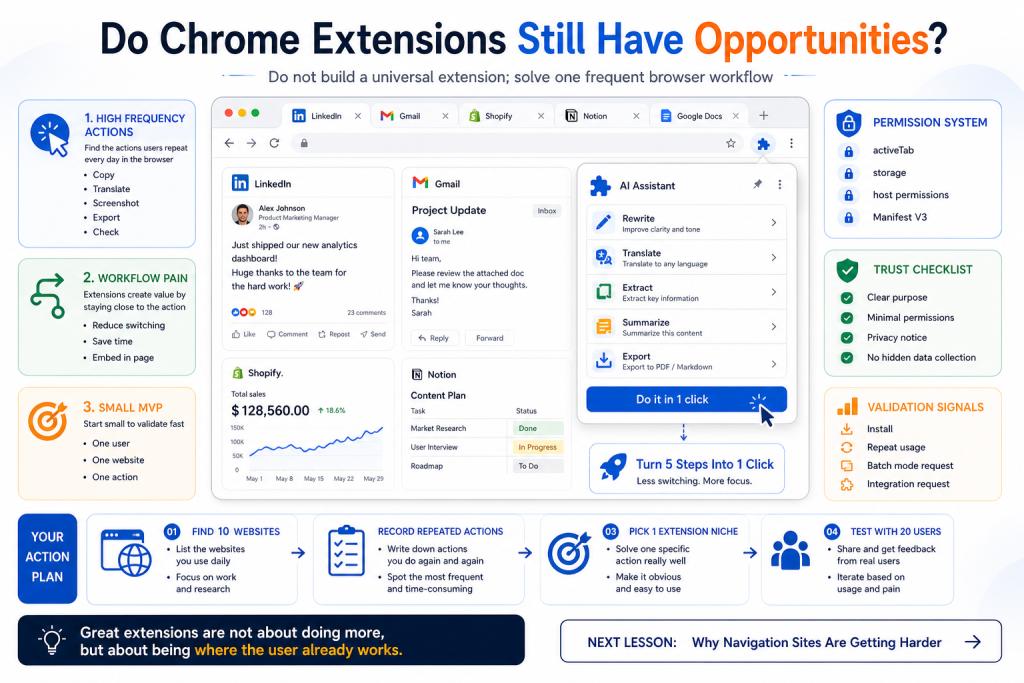
Yes, but the opportunity is not in building “an extension” as a product category. The opportunity is in turning a frequent browser action into a smoother workflow. Extensions are powerful because they live where users already work: Gmail, LinkedIn, Shopify, Notion, Google Docs, dashboards, admin panels, and web pages. If a user repeats a painful action inside the browser every day, an extension can be more natural than a standalone web app.
Opportunities Come From Frequent Browser Actions
Chrome extensions are best at solving small but frequent problems. A marketer copies data from web pages to spreadsheets. A salesperson collects leads from LinkedIn. A Shopify seller checks competitor prices. A writer saves web research into notes. A developer checks page metadata, APIs, or SEO tags. Each action may look small, but if it happens every day and takes several steps, the pain becomes real.
The key advantage of an extension is proximity. A web app asks users to leave their current workflow and open your product. An extension can appear inside the current page. This matters for actions like translation, rewriting, extraction, screenshotting, form filling, price tracking, and content saving. If you can reduce a five-step task into one click, users can feel the value immediately.
For example, a generic AI writing website may require users to copy text, open another page, paste, generate, copy again, and return to the original page. But a browser extension can let users select text inside Gmail, Shopify, or Google Docs and instantly rewrite, translate, summarize, or export it. The extension works not because it is AI, but because it puts AI at the point of action.
The Real Barrier Is Trust and Permissions
Many builders underestimate trust. Installing an extension means giving part of the browser to a third party. Users worry about page access, data collection, hidden tracking, and privacy. Chrome Web Store policies emphasize transparency, limited purpose, and appropriate permissions. If your extension asks for broad access without a clear reason, users will hesitate, and review may become harder.
This makes low-quality extensions harder to build, but it creates room for serious products. The right approach is a narrow purpose, minimal permissions, and clear explanation. Only request the permissions required for the core function. If text is sent to an AI API, explain when and why. If data is stored, explain where. If the extension only needs the active page when the user clicks a button, do not request access to every website by default.
Manifest V3 also forces better architecture. Background logic uses service workers, remote code is restricted, and extension code needs to be reviewable. This may feel annoying, but it pushes you toward a cleaner structure: content scripts for page interaction, service workers for events, popup or side panel UI for user actions, and your own API only when necessary. If you design with these rules from the beginning, extensions are still very buildable.
The First Version Must Be Extremely Small
The most common mistake is building a “browser AI assistant,” “all-in-one productivity extension,” or “universal side panel.” Those sound impressive but are hard to understand and harder to adopt. The first version should be so small that users understand it in one sentence: who it helps, on which website, and which action it turns from many steps into one.
Good examples are specific. “Extract Product Hunt competitor data into a spreadsheet.” “Rewrite Gmail replies in a natural business tone.” “Generate SEO descriptions on Shopify product pages.” “Save highlighted web text into a Notion database.” Each of these has a user, a page, and an action. That clarity makes validation easier.
For validation, do not focus only on installs. The stronger signal is repeated usage. Find 20 target users and watch whether they use the extension again. If they ask for batch mode, more fields, integrations, or support for another website, you may have found a real workflow. If they say it is interesting but never click again, the pain is not strong enough.
Summary
Chrome extensions still have opportunities, but not in generic all-in-one tools. The best opportunities meet three conditions: they solve a frequent browser action, they request minimal permissions and build trust, and they start with a small workflow that users can repeat. Do not treat an extension as a shortcut to easy distribution. Treat it as a tool that lives closer to the user’s work than a normal web app.
Homework
- Find 10 websites you use every week and record repeated actions such as copying, translating, exporting, checking, or summarizing.
- Pick 3 painful actions and write one sentence for each: who does what on which website.
- Choose 1 smallest extension niche and list the permissions it truly needs.
- Run a 7-day validation with 20 target users and focus on repeated usage.
Next Lesson
Why Navigation Sites Are Getting Harder
Be First to Comment