


AI Agents are everywhere now.
From ChatGPT plugins and AutoGPT to OpenHands and coding assistants, almost every new product calls itself an AI Agent.
When people first see OpenClaw, the common reaction is:
“So this is another agent framework?”
Not exactly.
If you treat OpenClaw as just another chatbot with tools attached, you will miss its real purpose.
OpenClaw is trying to solve a different problem:
Not how AI answers questions, but how AI continuously executes tasks.
It behaves less like a chat interface and more like an AI runtime system.
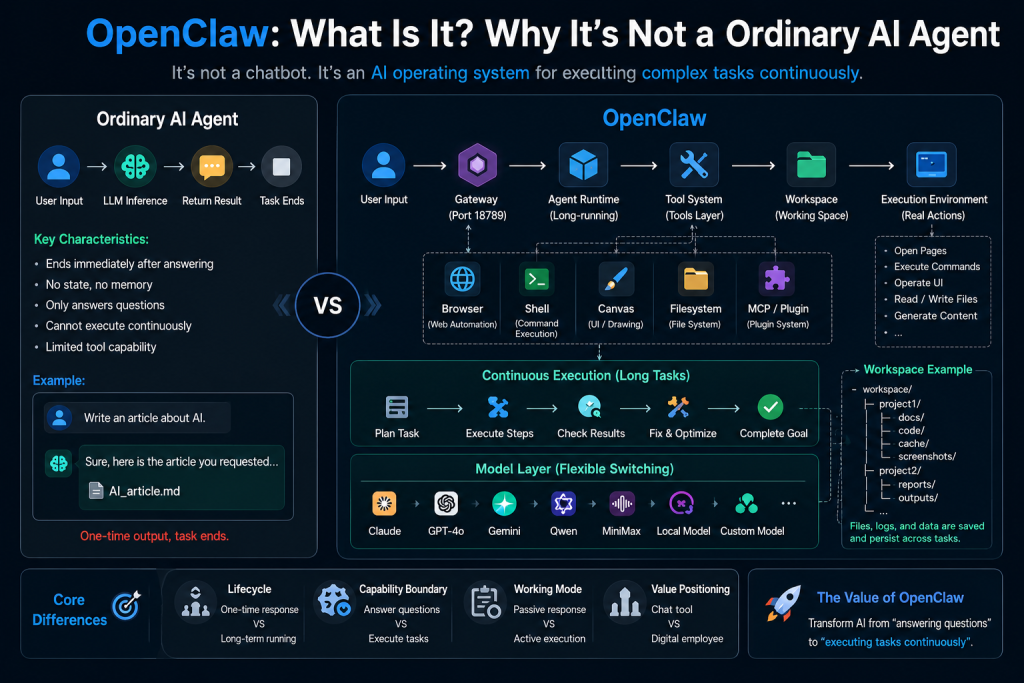
The Problem With Most AI Agents
Most AI agents today follow a simple lifecycle:
User Input
     ↓
LLM Reasoning
     ↓
Return Result
Example:
User:
Write an article about AI startups
Agent:
Generates a Markdown article
Task finished.
Or:
User:
Search information about a website
Agent:
Calls a search tool
Returns the result
Finished again.
The entire interaction is short-lived.
The agent receives input, produces output, and disappears.
There is:
- No persistent state
- No long-running execution
- No workspace
- No memory of ongoing work
- No task orchestration
They are excellent at answering.
They are not designed for operating.
OpenClaw Is Built Around Execution
OpenClaw approaches the problem differently.
Instead of asking:
“How should AI respond?”
It asks:
“How should AI work?”
Its architecture looks closer to this:
User
   ↓
Gateway
   ↓
Agent Runtime
   ↓
Tool Layer
   ↓
Workspace
   ↓
Browser / Shell / Filesystem
   ↓
Models
   ↓
Continuous Execution
Notice the difference.
There is much more than a model call.
OpenClaw introduces:
- Gateway
- Runtime environment
- Tool execution layer
- Persistent workspace
- File management
- Long-running tasks
- Execution context
This transforms the agent from a responder into a worker.
The Workspace Changes Everything
One of the biggest differences is that OpenClaw has a workspace system.
Traditional agents usually end after generating text.
OpenClaw keeps project state.
Example:
workspace/
├── project-a
│   ├── docs
│   ├── code
│   ├── screenshots
│   └── logs
│
├── project-b
│   ├── reports
│   └── outputs
The agent can:
- Save files
- Modify code
- Store reports
- Generate screenshots
- Keep logs
- Continue unfinished work
Imagine asking:
Build a Telegram customer support system
A normal AI agent may return:
Architecture
API design
Example code
Deployment steps
OpenClaw may actually do this:
Create folders
Generate project files
Install dependencies
Run commands
Test the workflow
Capture outputs
Fix issues
Continue execution
That is no longer a conversation.
That is project execution.
OpenClaw Is Closer to an AI Operating Layer
Many people see tools like:
Browser
Shell
Canvas
Filesystem
Plugins
and assume they are just extensions.
They are not.
They are execution primitives.
For example:
Shell:
git clone
npm install
docker compose up
Browser:
- Open websites
- Click buttons
- Extract information
- Perform navigation
Filesystem:
- Create files
- Update code
- Save results
- Organize outputs
Canvas:
- Generate assets
- Handle visual workflows
- Manage artifacts
Traditional AI says:
Run this command.
OpenClaw can execute it.
That difference becomes huge when tasks last hours instead of seconds.
Models Become Secondary
Many people think:
OpenClaw = Claude + Dashboard
That is not accurate.
OpenClaw can work with multiple providers:
- OpenAI
- Claude
- Gemini
- Qwen
- MiniMax
- OpenAI-compatible APIs
- Local models
- Self-hosted inference systems
You could build routing logic like:
Claude → Planning

Qwen → Coding

Gemini → Image tasks

OpenAI → Long documents

MiniMax → Fallback
At this point, the model is no longer the center.
The real value becomes:
task orchestration
Long-Running Tasks Are the Real Advantag
Traditional agent flow:
Write article
Done
OpenClaw flow:
Generate article
     ↓
Save files
     ↓
SEO optimization
     ↓
Create images
     ↓
Publish content
     ↓
Archive outputs
     ↓
Track results
Another example:
Building an SEO content pipeline:
Collect keywords
     ↓
Generate content
     ↓
Create visuals
     ↓
Publish pages
     ↓
Update metadata
     ↓
Store reports
No manual intervention.
No copy-paste loop.
Just execution.
This starts looking less like AI chat and more like:
digital workers
Where OpenClaw Becomes Powerfu
1. Content Operations
Examples:
- SEO pipelines
- Blog generation
- Social posting
- Reddit workflows
- Marketing automation
2. Business Assistant
Examples:
- Telegram support bots
- Enterprise chat systems
- Knowledge bases
- Internal AI workers
3. Development Automation
Examples:
- Generate code
- Run tests
- Deploy projects
- Fix issues
- Manage repositories
4. SaaS Agent Platforms
Example workflow:
User order
     ↓
Launch agent
     ↓
Execute workflow
     ↓
Return results
This opens opportunities for:
- AI SaaS products
- Agent marketplaces
- SEO factories
- Customer automation systems
- AI operation platforms
The Biggest Misunderstanding About OpenClaw
Many users deploy it:
docker compose up
Open the dashboard.
Chat for five minutes.
Then conclude:
OpenClaw feels ordinary.
That is usually the wrong test.
Wrong usage:
Hello
Tell me a joke
What's the weather?
Correct usage:
Crawl a website
Generate reports
Deploy code
Operate social channels
Update knowledge base
Run workflows
OpenClaw was not designed to be an AI friend.
It was designed to become an AI worker.
Final Thoughts
Most AI agents solve:
How should AI answer?
OpenClaw focuses on:
How should AI operate?
Traditional agent:
Input
   ↓
Output
OpenClaw:
Task
   ↓
Execution
   ↓
Tools
   ↓
Workspace
   ↓
State
   ↓
Long-running process
   ↓
Result
It is not simply another chatbot.
Not a plugin wrapper.
Not just a model UI.
OpenClaw moves closer to something larger:
An operating system for AI workers.
And that is what makes it different from ordinary AI agents.
Next Article
OpenClaw Architecture Explained: Gateway, CLI, Bridge, Runtime and Workspace
Be First to Comment